Dailies vs ThinkUp
Both send you a short line every day and both let you write your own. After that they diverge further than any other pair here: ThinkUp asks you to record affirmations in your own voice and listen back over music, while Dailies asks nothing after setup and puts a line where your eyes already are.
The short answer
Choose ThinkUp if you want a practice and you will actually do it. Recording your own affirmations and listening back is a deliberate exercise (it has a session, it takes minutes, it wants headphones), and its users rate it 4.7 across 7,500 ratings. It logs mindful minutes to Apple Health and runs on Apple Watch, which tells you what kind of app it thinks it is.
Choose Dailies if you know you will not sit down for it. Dailies has no session. It asks a few questions once, then a few good lines arrive during the day and you read one in three seconds while queueing for coffee.
The failure mode of ThinkUp is a recording you made in January and stopped playing in February. The failure mode of Dailies is a notification you swipe away without reading. Pick the failure you are less likely to have.
The effort question
Almost every difference below follows from what each app decided it was allowed to ask of you.
| ThinkUp | Dailies | |
|---|---|---|
| Setup | Choose affirmations, record them in your voice, pick music | A few questions, a number and a window |
| Daily ask | Listen (minutes, ideally with headphones) | Read one line (seconds, one-handed) |
| Works while | Walking, commuting, lying down, eyes closed | Anything. It is a glance |
| Does not work while | In a meeting, on a school run, at a desk with people | Driving, or any moment you cannot look |
Neither ask is wrong. Five minutes done properly will do more than a line you half-read. The catch is the word properly, and most people know from experience which side of it they land on.
At a glance
| Dailies | ThinkUp | |
|---|---|---|
| Maker | Amit Shabtay | Precise Wellness LLC |
| Store rating | New, no ratings yet | 4.7 from 7.5K ratings |
| The medium | Text you read | Audio you listen to, in your own voice |
| Library | A large library, cut into narrow topics | 300+ ready-made affirmations across 10+ goals, or write your own |
| How it aims | Narrow topics you follow, changed whenever you like | You choose and record the lines yourself |
| Delivery | As many or as few a day as you like, at unannounced times inside a window | Notifications reminding you to listen |
| Widgets | Home Screen and Lock Screen | None listed |
| Styling | Photographic backgrounds, typefaces, motion effects, your own photos and colors | Add an image behind an affirmation |
| Extras | Share as a picture, write your own lines | Background music, auto-stop timer, Apple Health mindful minutes |
| Runs on | iPhone, iPad | iPhone, Apple Watch |
| Account | None. There is no sign-in | Not mentioned on its listing |
| Languages | English, Spanish, French, German and Simplified Chinese | English |
| Age rating | 13+ | 9+ |
| Download size | Small (the library is text) | 145.6 MB |
| Price | One yearly subscription with a free trial | $7.99/month, $39.99/year, $99.99 for life |
Your voice, or a library already written
ThinkUp’s central idea is that an affirmation in your own recorded voice carries further than one you read; its listing puts it as recording in the voice your brain trusts. Everything serves that: the recording flow, the music, the timer, the Watch app.
The commitment is also the cost. You have to record, and free accounts cap how many affirmations you hold and how long each runs. Your library is then as good as the twenty minutes you spent making it, which is fine when you are motivated and thin when you are not.
Dailies has no recording, no audio and no microphone access. Its opposite move is a library already written, most of it for this app, so there is nothing to fill in. What you supply is a set of topics, and the library sorts itself around them.
Where they meet: Dailies also lets you write your own lines. On Premium they join the rotation with the rest of the library, they stay on the device, and they are never shown to anyone else.
When it reaches you
ThinkUp notifies you to listen: morning, noon and evening, in its own framing. The notification is a prompt to start a session.
In Dailies the notification is the session. You choose how many quotes, which hours and which days; it picks the exact moments inside that window and does not say in advance. The line is on the Lock Screen when you look, and if you never open the app you still got what you came for.
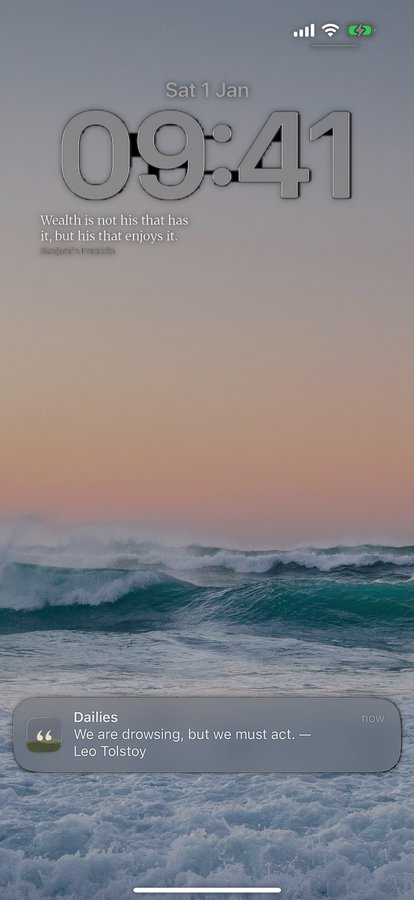
A Home Screen widget carries the same line between notifications, and steps to the next quote or shares it without opening the app. ThinkUp’s listing describes no widgets; its surface is the session and the Watch.
What it costs
ThinkUp’s US listing on 8 September 2026 showed $7.99 a month, $39.99 a year and $99.99 for life, with a three-month option at $14.99. Premium lifts the caps on how many affirmations you can record and how long they run, and opens the music.
Dailies sells one yearly subscription with a free trial, priced in your currency and shown in full before you confirm. It opens the full background, typeface and effect library, your own photos and colors, and the rest of the quote library. No monthly, no lifetime, and no ads at any tier.
Which one to pick
| If you… | Pick |
|---|---|
| Want a deliberate daily practice with a start and an end | ThinkUp |
| Believe your own voice is what will make it land | ThinkUp |
| Want mindful minutes in Apple Health, or an Apple Watch app | ThinkUp |
| Have never once completed a daily audio practice | Dailies |
| Need something that works with your hands full and no headphones | Dailies |
| Would rather be handed good writing than write it yourself | Dailies |
| Want a line on the Lock Screen without opening anything | Dailies |
These two do not fight over the same minute, which is why plenty of phones could carry both. ThinkUp is a morning or bedtime thing, headphones on, ten minutes. Dailies is the other sixteen hours. If ThinkUp already works for you, the question is whether the middle of your day is covered.
Questions
Can I record my own voice in Dailies?
No. Dailies has no audio and no microphone access at all. You can write your own lines, which on Premium join the rotation with the rest of the library and stay on your device.
Which takes less time each day?
Dailies, by a wide margin. A quote is a three-second read on the Lock Screen. ThinkUp is a listening session, and the app is designed around you giving it a few minutes.
Does either need headphones?
ThinkUp is much better with them, since the point is listening to your own recorded voice over music. Dailies is silent.
Which has more to read?
Dailies, comfortably: it ships a large library cut into narrow topics. ThinkUp lists 300+ ready-made affirmations across 10+ life goals, on the assumption that you will record and repeat a handful rather than read your way through a catalog.
Which is cheaper?
ThinkUp listed $39.99 a year on 8 September 2026, and also sells monthly and lifetime. Dailies sells one yearly subscription with a free trial. Prices in this category move, so check both listings.
Does Dailies need an account?
No. There is no sign-in anywhere in Dailies. Your favorites, your settings and anything you write stay on the device.
Sources
ThinkUp’s rating count, size, language, age rating, device support and feature list were read from its US App Store listing on 21 September 2026, version 1.18.11; its price points were read from the same listing in the App Store app on 8 September 2026. Dailies is described from the shipping build, in words rather than figures: its library, free tier and delivery limits move with every release, so a number here would go stale.
More comparisons: Dailies vs Motivation, Dailies vs I am, Dailies vs Motivate.
No session. No headphones.
Set it up once. Dailies takes it from there.